OBI metrics cardinality
You are viewing the English version of this page because it has not yet been fully translated. Interested in helping out? See Contributing.
The cardinality of OBI metrics highly depends on the size and complexity of the instrumented environment, so there is no way to provide a simple and accurate formula.
This document tries to provide an approximation of the metrics cardinality that might be produced by a default OBI installation. It is divided into several sections for each type of metric that OBI can produce, as each metric family can be selectively enabled or disabled.
The worked series counts below assume one cluster, classic Prometheus histograms, and OBI’s default bucket boundaries. Native histograms and OTLP histograms have different representations. Estimate each cluster separately.
Terminology
Before continuing, we should clarify some terms that might be vague or subject to interpretation:
- Instance: is each instrumentation target. In application-level metrics, it would be the service or client instance. In Kubernetes, it would be a Pod. An application instance might run in multiple processes. In network-level metrics, each instance is the OBI instance that instruments all the network flows in a given host.
- Instance Owner: in Kubernetes, most instances (Pods) have an owner resource. Sometimes you might prefer to report data about the owners instead of the instances, to keep cardinality under control. Examples of instance owners are Deployments, DaemonSets, ReplicaSets, and StatefulSets, but if a Pod does not have any owner (standalone Pod), the Pod itself is reported as owner.
- URL Path: is the Raw path of a URL request, as sent by the client and
received by the Server, for example:
/clients/348579843/command/833. - URL Route: is an aggregated path of a URL request, semantically grouped to
keep the cardinality under control. It usually mimics the way that some web
frameworks let you define HTTP requests in code, for example:
/clients/{clientId}/command/{command_num}. - Operation: describes what functionality has been requested:
- HTTP: all HTTP verbs, for example
GET, followed by the URL route - gRPC: the path of the service
- SQL: SQL commands, for example
SELECT,UPDATEor other commands, followed by the target table - Kafka: Produce/Fetch
- HTTP: all HTTP verbs, for example
- Server: is any instance that receives and processes HTTP or gRPC requests. A server can also be a client.
- Client: is any instance that submits HTTP, gRPC, database or MQ requests. A client can also be a server.
- Service: in the Kubernetes context, is functionality provided by a group of servers that are accessed through a common host name and port.
- Endpoint: is an IP or hostname and port that identifies either a service, a server, or a client.
- Return code: returned by each service invocation, describes some meta-information about the result of the execution. For HTTP they are HTTP status codes, for other protocols it’s usually 0 (success) or 1 (error).
Application-level metrics
For application-level metrics, we can’t follow a simple multiplication formula, as there are multiple factors that influence cardinality, but they aren’t linearly related.
For example, both the number of HTTP routes and Server addresses increase the cardinality, but we can’t just multiply them because not all the server instances accept the same HTTP routes.
The following formula could provide an extremely rough maximum limit, but in our measurements, the observed cardinality was much lower than the calculation. For this reason, measure the exported series alongside any estimate.
However, here is a list of factors that can influence the overall cardinality:
- Instances: the number of instrumented entities. They can be both services and clients.
- MetricNames: the number of application-level metric names. This varies depending on the type of applications that OBI instruments. Count one for each metric that is going to be reported.
- Client-side metrics, when OBI instruments applications that perform requests
to other applications:
http.client.request.durationhttp.client.request.body.sizehttp.client.response.body.sizerpc.client.call.durationdb.client.operation.durationmessaging.client.operation.durationmessaging.process.duration
- Server-side metrics, when OBI instruments application that dispatches requests
from other applications:
http.server.request.durationhttp.server.request.body.sizehttp.server.response.body.sizerpc.server.call.duration
- Error types: starting with v0.14.0, HTTP duration and body-size Prometheus
series have an
error_typelabel. A successful request has an empty value. Multiple error types for the same operation, endpoint, and status code create separate series. Count the values observed in your deployment rather than multiplying every HTTP series by a fixed factor. - Database collections and RPC ports: starting with v0.15.2, database
duration metrics include
db.collection.name, RPC client duration includesserver.port, and failed RPC server duration includeserror.typeby default. Count the distinct combinations observed for each operation. Messaging duration metrics can also split by operation type and subscription name. - HistogramBuckets need to be accounted for, as each application metric in
this example is a histogram. OBI’s defaults have 15 explicit duration bucket
boundaries and 10 body-size boundaries. Prometheus adds a
+Infbucket, sum, and count, producing 18 or 13 series per attribute combination, respectively. - Operations is equivalent to the functionality that is invoked. In HTTP services, it would group the HTTP method and the HTTP route, in RPC it is the RPC method name.
- Endpoints is the count of server addresses and ports.
- ReturnCodes is the number of possible results of the operation. Typically Ok/Err in gRPC, or the HTTP status code.
Example calculation
Operands in the presented cardinality formula might overlap. For example, an
instrumented client application might send /foo and /bar HTTP requests, and
connect to both services A and B, so:
- Operations: 2
- Endpoints: 2
The Operations * Endpoints quotient would multiply cardinality by 4. However
if the /foo route is exclusive of service A and the /bar route is exclusive
of service B, the actual cardinality multiplier would be only 2.
When you calculate the cardinality, set optimistic and pessimistic bounds for your calculations.
The following example illustrates how to calculate the cardinality of the example system. Both client and Backend are instrumented by OBI. The other components are external:
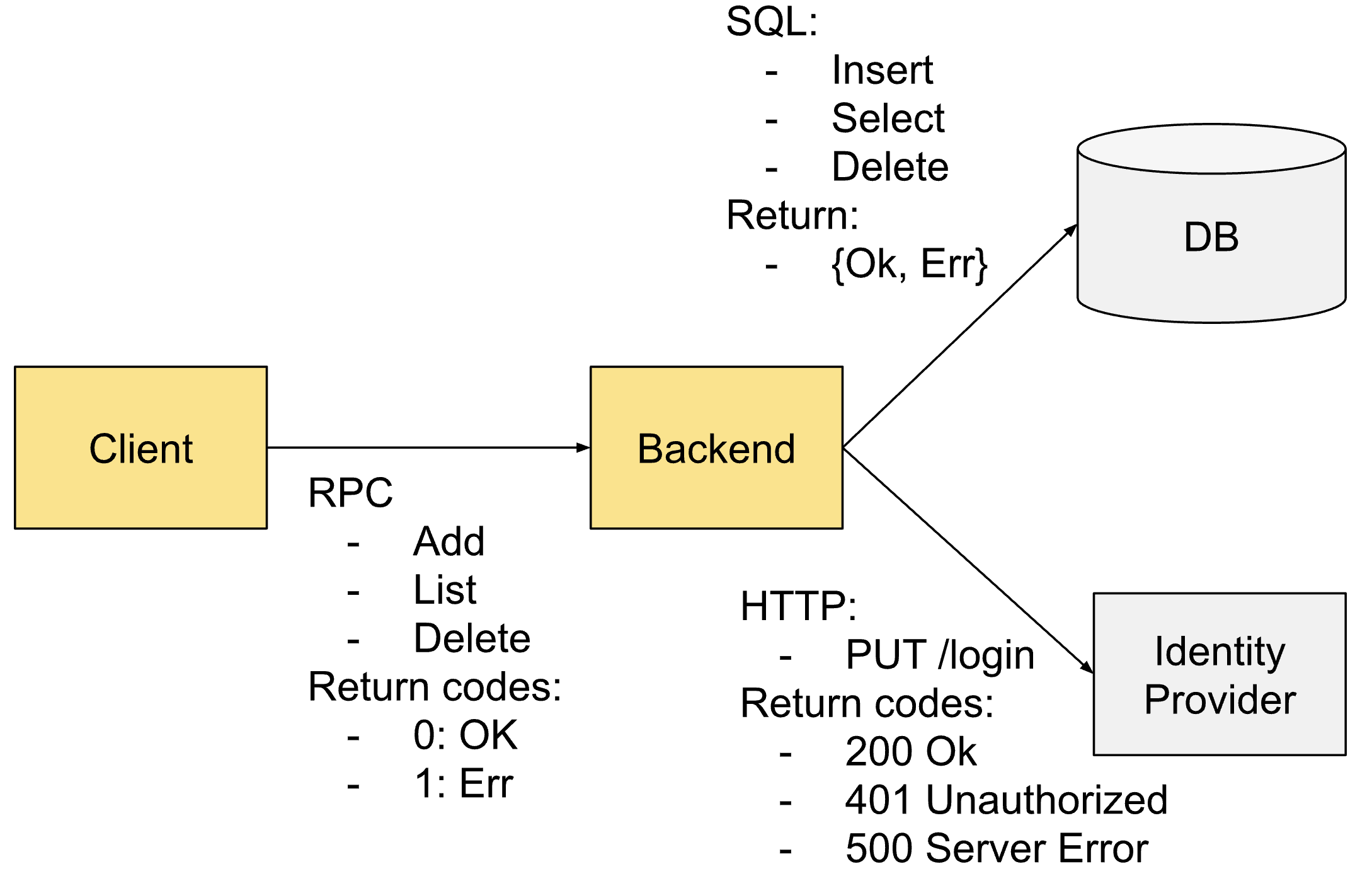
The pessimistic calculation would be:
#Instances * #MetricNames * #HistogramSeries * #Operations * #Endpoints * #ReturnCodes
= 2 * 5 * 18 * 7 * 3 * 7 = 26,460
The numbers taken as reference:
- 2 instances, client and backend
- 5 metric types, according to their role and protocols:
- Client
rpc.client.call.duration
- Backend as a RPC server
rpc.server.call.duration
- Backend as an SQL and HTTP client
http.client.request.durationhttp.client.request.body.sizedb.client.operation.duration
- Client
- 18 series per duration histogram (15 explicit buckets,
+Inf, sum, and count), using the duration histogram size as a pessimistic bound; the body-size histogram has 13 series - 7 operations: RPC Add/List/Delete, HTTP PUT, SQL Insert/Select/Delete
- 3 endpoints: backend, Identity provider, and DB
- 7 Return codes: RPC OK/Err, HTTP 200/401/500, SQL OK/Err
This bound is deliberately loose: SQL operations do not multiply RPC and HTTP
metrics, and only the client or server emits each metric. It also assumes one
error_type value per HTTP status code; additional error types can split those
series further. The worked count also assumes one database collection per SQL
operation, one RPC server port per endpoint, and one RPC error type per failed
operation.
Under these assumptions, we can count 417 series from the five listed metrics, far fewer than the pessimistic bound of 26,460:
| # | Instance | Metric | Endpoint | Operation | Code |
|---|---|---|---|---|---|
| 1 | Client | rpc.client.call.duration | Backend | Add | OK |
| 2 | Client | rpc.client.call.duration | Backend | Add | Err |
| 3 | Client | rpc.client.call.duration | Backend | List | OK |
| 4 | Client | rpc.client.call.duration | Backend | List | Err |
| 5 | Client | rpc.client.call.duration | Backend | Delete | OK |
| 6 | Client | rpc.client.call.duration | Backend | Delete | Err |
| 7 | Backend | rpc.server.call.duration | Add | OK | |
| 8 | Backend | rpc.server.call.duration | Add | Err | |
| 9 | Backend | rpc.server.call.duration | List | OK | |
| 10 | Backend | rpc.server.call.duration | List | Err | |
| 11 | Backend | rpc.server.call.duration | Delete | OK | |
| 12 | Backend | rpc.server.call.duration | Delete | Err | |
| 13 | Backend | http.client.request.duration | Identity Prov | PUT /login | 200 |
| 14 | Backend | http.client.request.duration | Identity Prov | PUT /login | 401 |
| 15 | Backend | http.client.request.duration | Identity Prov | PUT /login | 500 |
| 16 | Backend | http.client.request.body.size | Identity Prov | PUT /login | 200 |
| 17 | Backend | http.client.request.body.size | Identity Prov | PUT /login | 401 |
| 18 | Backend | http.client.request.body.size | Identity Prov | PUT /login | 500 |
| 19 | Backend | db.client.operation.duration | DB | Insert | OK |
| 20 | Backend | db.client.operation.duration | DB | Insert | Err |
| 21 | Backend | db.client.operation.duration | DB | Select | OK |
| 22 | Backend | db.client.operation.duration | DB | Select | Err |
| 23 | Backend | db.client.operation.duration | DB | Delete | OK |
| 24 | Backend | db.client.operation.duration | DB | Delete | Err |
For the sake of brevity, we haven’t counted the histogram buckets. Next we
multiply the metrics instances by the histogram buckets, plus histogram _count
and _sum:
- 3 body-size metric instances x 13 = 39
- 21 duration metric instances x 18 = 378
Total accounted cardinality: 417
The example illustrates why one formula does not predict deployment cardinality. Even this count depends on the enabled metrics and label values. In a larger Kubernetes cluster, measure the exported series to account for the actual workload connections and attributes.
Network-level metrics
It is simpler to estimate network-level metrics than application-level metrics.
The network feature exports the obi.network.flow.bytes counter. You can also
enable packet and inter-zone byte counters separately. Cardinality depends on
which endpoints communicate and which attributes you select.
The default attributes for obi.network.flow.bytes are:
direction:request,response, orunknown.- Source and destination endpoint owner names, owner types, and namespaces when
Kubernetes metadata is enabled:
k8s_src_owner_name,k8s_src_owner_type,k8s_src_namespace,k8s_dst_owner_name,k8s_dst_owner_type, andk8s_dst_namespace. k8s_cluster_name: unique for each cluster. We assume a single cluster, as for the rest of metrics. This attribute also requires Kubernetes metadata.
In these examples, each owner count represents a distinct namespace, owner name,
and owner type combination, so owner type needs no separate multiplier. Count
the distinct direction values observed for each owner pair.
The simplified, pessimistic formula, would be:
#Directions * #SourceOwners * #DestinationOwners
We’ve assumed that all the source owners are connected to all the destination owners. It’s more realistic to apply a connection factor, for example a cluster with 100 Deployments/DaemonSets/StatefulSets, where each owner is connected to 2 other owners on average, would have a cardinality of:
2 directions x 100 source owners x 2 destination owners = 400 series for the
byte counter if both request and response occur for every owner pair. An
unknown direction value could add more. Additional metric features also add
series.
Service Graph metrics
Service Graph metrics are produced for instances that can be instrumented with Application metrics, for example HTTP, RPC, SQL, Redis, and Kafka. Network Metrics are produced for any instance with network traffic, whatever protocol it uses.
Service Graph Metrics produce the following metrics:
traces_service_graph_request_client: histogram with 15 bucketstraces_service_graph_request_server: histogram with 15 bucketstraces_service_graph_request_failed_total: countertraces_service_graph_request_total: counter
Each metric also has the following attributes:
source: obiclientandclient_namespaceserverandserver_namespace
The calculation is similar to network metrics but with higher cardinality:
- Instead of a network byte counter, we are reporting a set of metrics/histograms with an overall cardinality of 38, two 18-series histograms and two counters.
- Instead of aggregating by the owner of an instance, for example Deployment, the client is the instance that submits a request, while the server might be the Owner, as it’s usually accessed through a single service instance.
Span metrics
With the optional application_span_otel feature, OBI exports:
traces.span.metrics.duration: histogram with 15 explicit buckets,+Inf, sum, and count when exported through Prometheustraces.span.metrics.calls: counter
The deprecated application_span feature uses the older
traces_spanmetrics_latency and traces_spanmetrics_calls_total names. The
deprecated application_span_sizes feature adds two size counters without a
replacement. See
metrics export features.
Attributes that might add cardinality to each metric are:
- Service/ServiceNamespace/Instance ID
- Span Kind: Client/Server/Internal
- Span Name: usually the name of the operation and might have high cardinality
- Return codes
Maximum cardinality could be roughly calculated as:
19 metric series * 3 span kinds * #Instances * #Operations * #ReturnCodes
As depicted in the previous example of calculation for application metrics, we’ve made assumptions that the large number of HTTP return codes would only multiply to HTTP services, or that some groups of instances would have only a subset of the total routes.
Case study: cardinality of OpenTelemetry Demo
The measurements below came from one earlier deployment of the OpenTelemetry Demo in a local three-node cluster. Its bundled OpenTelemetry instrumentation was disabled and OBI performed the instrumentation. These counts represent that deployment. Use the queries to inspect your deployment and include its enabled metric families and selected attributes when estimating current cardinality.
Measure application-level metrics
As most instrumented instances are both client and services, we ignore the
#instances argument in the formula to be more accurate:
#MetricNames * #HistogramSeries * #Operations * #Endpoints * #ReturnCodes
To minimize the effects of attributes influencing non-linearly in the final cardinality, we calculate cardinality numbers for all the metric types separately (HTTP, gRPC and Kafka).
HTTP metrics:
- 4 HTTP histogram metrics included in this example
- 15 explicit histogram buckets,
+Inf, sum, and count, as a pessimistic per-metric bound - Known operations: 75, measured from a running OTel Demo with the PromQL query:
group by (http_request_method, http_route)({__name__=~"http_.*"}) - 26 endpoints, measured from a running OTel Demo with the PromQL query:
group by (server_address, server_port)({__name__=~"http_.*"}) - 6 response status codes: 200, 301, 308, 403, 408 and 504, extracted from the running OTel demo
Starting with v0.14.0, the application feature can export six HTTP histogram
families: client and server duration, request body size, and response body size.
Include the families your deployment actually emits rather than reusing the
four-metric factor from this earlier snapshot.
The total, maximum calculated limit for HTTP metrics is:
4 x 18 x 75 x 26 x 6 = 842,400
This shows how ineffective the formula is for the application-level metrics, as the measured number is much lower, even for all the known application metric types:
count({__name__=~"http_.*|rpc_.*|sql_.*|redis_.*|messaging_.*"}) → 9,600
Measure network-level metrics
For the byte counter with default attributes, if each of the 21 demo deployments
communicates with all 21 deployments and both request and response occur for
every owner pair, the estimate is:
2 × 21 × 21 = 882 series
Counting only the 29 connections in the architecture diagram, with both directions for each, gives a lower estimate:
2 × 29 = 58 series
The default direction attribute can also have an unknown value, which could
add more series. Count owners with different namespaces or types separately.
Network metrics measure the OpenTelemetry Demo connections, other internal
cluster connections, and instrumentation traffic. Query the current total with
count(obi_network_flow_bytes_total).
We can group traffic between namespaces to get a better idea of which part belongs to the OpenTelemetry demo with the following query:
count(obi_network_flow_bytes_total) by (k8s_src_namespace, k8s_dst_namespace)
The earlier snapshot recorded the following namespace pairs, totaling 312 series:
| k8s_src_namespace | k8s_dst_namespace | count |
|---|---|---|
| default | default | 156 |
| kube-system | default | 47 |
| default | kube-system | 47 |
| default | 14 | |
| default | 14 | |
| kube-system | 13 | |
| kube-system | 13 | |
| gmp-system | 3 | |
| gmp-system | 3 | |
| default | gmp-system | 1 |
| gmp-system | default | 1 |
The number of network metrics generated by the OpenTelemetry demo for traffic
between the demo components is 156. The default namespace is both the source
and destination. There is other traffic to kube-system, gmp-system, or no
namespace at all, which belongs to external connections, telemetry, or
Kubernetes management.
Measure service graph metrics
Network metrics are often used to build service graphs, but the actual Service graph metrics would have a different shape:
- Instead of the network byte counter, we have two counter metrics and two
histogram metrics with 15 explicit buckets,
+Inf, sum, and count. - Service Graph metrics usually ignore internal Kubernetes traffic or any traffic from instances that are not instrumented at an application level.
The measured number is:
count({__name__=~".*service_graph.*"}) → 2300
Measure span metrics
In the application-level metrics calculation, we demonstrated that trying to get an analytical number was difficult due to the high number of involved parameters. We can get a correct measurement of the cardinality measuring it with PromQL:
count({__name__=~".*spanmetrics.*"}) → 3900 in the earlier deployment. For
application_span_otel, query traces_span_metrics_.* instead.
Opinia
Czy ta strona była pomocna?
Thank you. Your feedback is appreciated!
Please let us know how we can improve this page. Your feedback is appreciated!